
Custom CRM vs. Off-the-Shelf: How to Decide in 2026
Outgrowing spreadsheets or paying for unused SaaS features? Here is how to evaluate total cost of ownership, flexibility, and when to build a custom CRM.
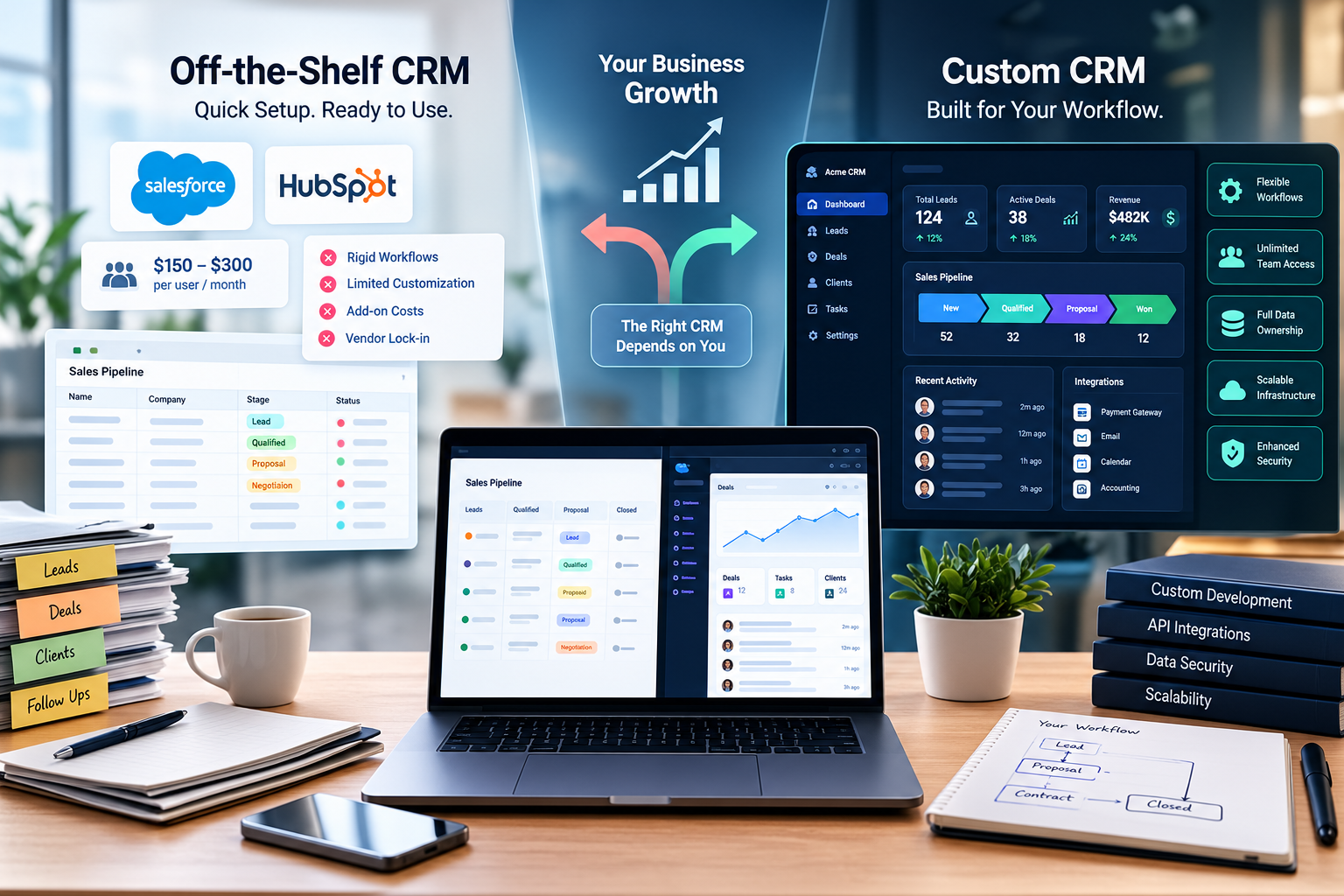
Custom CRM vs. Off-the-Shelf CRM: Which Is Right for Your Business?
Most companies do not start their sales operations with enterprise software.
They start with a shared spreadsheet, a set of color-coded tags, and a shared inbox.
This setup works remarkably well until deal volume expands, handoffs multiply, and critical client records begin slipping through the cracks.
At that inflection point, leadership teams face a pivotal architectural dilemma:
Should you license an enterprise platform like Salesforce or HubSpot, or invest in custom CRM development tailored precisely to your operational workflow?
Choosing the wrong path can lead to two common failure modes:
- Paying steep per-seat monthly license fees for bloated software your team resists using.
- Spending significant development capital building custom tools when an off-the-shelf platform would have been sufficient.
Here is a practical technical framework for evaluating custom CRM vs. off-the-shelf CRM software for your organization.
The Hidden Costs of Off-the-Shelf CRM Platforms
Packaged CRM solutions offer speed.
You can configure an account, import a .csv of contacts, and issue seats to your team by the end of the day.
For straightforward B2B sales cycles with standard deal pipelines, this convenience can be difficult to beat.
However, as business operations mature, packaged SaaS platforms can introduce several compounding costs.
1. The Per-Seat Tax on Growth
SaaS pricing models can become increasingly expensive as an organization grows.
Adding back-office support, operational coordinators, field staff, or other users may require additional paid seats or higher subscription tiers.
What begins as a relatively small monthly expense can eventually become a significant recurring software budget.
2. Workflow Distortions
Off-the-shelf CRM platforms are designed around predefined operational models.
When your delivery model deviates from conventional lead-to-opportunity stages, teams may need to work around the platform.
Examples include:
- Multi-stage milestone billing
- Bespoke product configurations
- Complex approval processes
- Strict regulatory checkpoints
- Industry-specific workflows
- Custom fulfillment processes
Instead of eliminating manual work, the CRM can result in teams maintaining secondary spreadsheets and external tools to bridge system limitations.
3. Costly Customization and Add-On Lock-In
The need for deeper integrations can quickly increase the total cost of an enterprise CRM.
Examples include:
- Bi-directional data synchronization
- Custom webhooks
- Automated PDF contract generation
- Specialized reporting
- Third-party integrations
- Marketplace applications
- External automation platforms
These requirements may push businesses toward higher subscription tiers, specialized plugins, or third-party integration providers.
The fundamental problem: When your software dictates your business process instead of supporting it, operational drag can eventually exceed the software's nominal value.
4 Clear Indicators You Have Outgrown a Pre-Packaged CRM
How do you determine whether your business is genuinely ready for bespoke CRM software?
Look for these four operational bottlenecks.
1. Your Core Value Lies in a Proprietary Operational Workflow
If your competitive advantage comes from how you route leads, calculate estimates, manage projects, or coordinate field operations, forcing those processes into standard CRM modules can dilute operational efficiency.
A bespoke CRM can model your domain logic around the way your business actually operates.
Instead of adapting your process to the software, the software is designed around the process.
2. High-Volume Transactional Roles Require System Access
Consider a business where operations staff, warehouse personnel, contractors, or field employees need access to client information.
With a per-user SaaS pricing model, providing access to dozens of employees can create substantial recurring costs.
A custom platform can instead implement role-based access control around your specific organizational structure.
For example:
Administrator
    ↓
Sales Manager
    ↓
Sales Representative

Operations Manager
    ↓
Operations Staff

External Contractor
    ↓
Limited Client Access
This allows each role to access only the information and functionality it actually requires.
3. Disconnected Data Silos and Fragile Webhooks
Another warning sign is a growing dependency on generic automation tools, middleware, and fragile webhooks simply to keep your systems synchronized.
For example:
CRM
 ↓
Automation Platform
 ↓
Webhook
 ↓
Middleware
 ↓
ERP
 ↓
Another Integration
 ↓
Reporting System
Every additional integration creates another potential point of failure.
If an API payload is dropped, delayed, or processed out of order, sales and fulfillment teams may end up working with inconsistent information.
A custom CRM can centralize important business logic and reduce unnecessary integration layers.
4. Strict Data Residency and Compliance Requirements
Organizations handling sensitive client information may require greater control over how their data is stored, accessed, backed up, and audited.
A custom CRM can be deployed using dedicated infrastructure such as:
- PostgreSQL
- Supabase
- Private cloud infrastructure
- Dedicated application servers
- Organization-controlled backup systems
This can provide greater control over:
- Audit logging
- Encryption
- Database access
- Backup routines
- Data retention
- User permissions
- Infrastructure configuration
A Cost Comparison: 3-Year Total Cost of Ownership
Evaluating a CRM solely by its initial deployment cost can obscure the true financial picture.
A 3-year Total Cost of Ownership (TCO) analysis provides a more useful framework.
| Evaluation Factor | Off-the-Shelf Enterprise SaaS | Bespoke Custom CRM |
|---|---|---|
| Upfront Investment | Lower; typically setup and configuration costs | Higher initial development cost |
| Ongoing Licensing | Recurring per-user or tier-based fees | No per-seat software licensing |
| Infrastructure & Hosting | Generally included in subscription | Separate cloud infrastructure and hosting costs |
| Feature Adaptability | Constrained by vendor capabilities and roadmap | Adaptable to changing business requirements |
| Business Logic | Must fit the platform's architecture | Designed around your operational workflow |
| Data Ownership | Vendor-controlled infrastructure and schema | Direct ownership of your database |
| Integrations | Often dependent on APIs, plugins, and middleware | Can be built directly into the platform |
| Scalability | Scales according to vendor pricing and architecture | Infrastructure can be scaled according to requirements |
| Customization | Available, but may require higher tiers or add-ons | Full control over application functionality |
For a team of 30 internal users, enterprise CRM licensing can become a significant recurring expense depending on the platform, subscription tier, and required features.
Over a three-to-five-year period, businesses should therefore compare total ownership cost, rather than looking only at the initial implementation price.
Important: The financial outcome depends heavily on the CRM vendor, number of users, required features, development cost, infrastructure requirements, and ongoing maintenance. A custom CRM is not automatically cheaper in every scenario.
The Hybrid Alternative: Build Custom Integrations First
Building a completely bespoke CRM is not an all-or-nothing decision.
For many organizations, a phased hybrid approach can reduce implementation risk.
Phase 1: Retain Standard Lead Capture
Continue using lightweight tools for basic top-of-funnel activities such as:
- Contact forms
- Lead capture
- Email collection
- Basic pipeline management
Phase 2: Build Dedicated Internal Portals
Develop custom dashboards for operational processes that existing CRM software does not handle efficiently.
Examples include:
- Order fulfillment
- Operational tracking
- Client reporting
- Internal approvals
- Field operations
These systems can communicate with existing CRM platforms through APIs.
Phase 3: Migrate Core Workflows Incrementally
Move critical operational logic away from third-party tools one module at a time.
For example:
Existing CRM
     │
     ├── Lead Management
     │
     ├── Sales Pipeline
     │
     ↓
Custom Operations Portal
     │
     ├── Fulfillment
     ├── Client Reporting
     ├── Internal Workflow
     └── Business Logic
This approach allows the architecture to be tested against real business operations without forcing the organization through a disruptive system-wide migration.
Custom CRM vs. Off-the-Shelf: What Should You Choose?
The decision ultimately comes down to how closely your operational workflow fits the capabilities of existing CRM platforms.
An Off-the-Shelf CRM May Be Appropriate If:
- Your sales process follows conventional stages.
- Your team is relatively small.
- Standard CRM features cover most requirements.
- You need to deploy quickly.
- You prefer predictable implementation over extensive customization.
- The vendor's integrations meet your requirements.
- Your business processes are unlikely to change significantly.
Custom CRM Development May Be Appropriate If:
- Your workflow is a significant competitive differentiator.
- Your processes do not fit conventional CRM models.
- You require complex business rules.
- Many non-sales employees require system access.
- You need deep integrations with internal systems.
- You require greater control over data and infrastructure.
- Existing CRM customization has become difficult or expensive.
- Your organization needs functionality that is unlikely to be available in standard CRM products.
Making the Decision
Choosing between custom software and an off-the-shelf CRM comes down to a straightforward business calculation.
If your customer relationship workflow is standard, repeatable, and well-supported by conventional CRM functionality, an off-the-shelf platform may provide the fastest path to implementation.
If your workflow represents a core operational differentiator and existing platforms consistently force your team to work around rigid constraints, a purpose-built CRM can turn those workflows into a technology asset tailored to your business.
The important question is not simply:
"Which CRM is better?"
The better question is:
"Which approach fits the way our business actually operates?"
Need a Custom CRM for Your Business?
Evaluating whether your operational workflows warrant custom software?
Learn more about our approach to custom CRM development and internal business systems, or contact us for an architectural consultation.
Build the software around your business instead of forcing your business to work around the software.